
Quick Summary
Systematic automatic gate troubleshooting helps property owners quickly distinguish between minor issues like misaligned photo-eyes and severe mechanical strain before drive motors suffer permanent damage. While basic tasks like clearing debris or testing remote batteries are safe to perform independently, the diagnostic specialists at Ironworks Gate Co. emphasize contacting certified technicians for complex faults involving fried circuit boards, failing motor capacitors, or hydraulic systems. After reading this guide, property owners will know how to methodically test power supplies and safety sensors, as well as when to call Ironworks Gate Co. for a free on-site diagnostic assessment and same-day repair.
Automatic Gate Troubleshooting: Fix Driveway Gates Fast
When an automated driveway gate refuses to open or close, a methodical diagnostic process helps identify whether the failure comes from an electrical disruption, safety sensor misalignment, or physical drag along the tracks and hinges. On heavy residential estate gates and commercial barriers, as specialists at Ironworks Gate Co. emphasize, diagnosing mechanical load resistance early prevents operator damage, gear wear, and control board failure.[2]
Gate diagnostics must always prioritize life-safety standards. Safety standards for automatic security gates were introduced after documenting fatal and nonfatal injuries involving gate movement, crushing points, and entrapment zones. Failure to detect a person at the closing edge and excessive closing force represent key operational hazards. Incidents have shown that powered gates pose severe risks when presence at the closing edge is not detected and closing force is excessive. Never bypass safety devices, keep people clear of moving gates, and always call a qualified technician when dealing with electrical systems, hydraulic pressure, structural hinge welds, force limits, or safety recalibrations.[1] See also Automatic Gate Repair | Call Now-10% Off | On-Site in 60 Minutes | Free Estimate.
Automatic Gate Troubleshooting: Quick Diagnostic Overview
A reliable diagnostic routine isolates electrical power issues from physical drag before you risk damaging the drive motor. Forcing an operator to push against a binding hinge, bent ground track, or jammed roller causes severe mechanical strain and motor failure.
Immediate Action Checklist
- Check the Electrical Power Supply: Verify that the dedicated breaker in the subpanel and any inline reset switches are active before assuming an internal motor fault. Consult the manufacturer manual for specific power requirements.
- Inspect Safety Detection Devices: Clean dust, spider webs, and debris from sensor lenses and reflectors. Check status indicators according to the operator manual.
- Test Input Devices: Check primary remotes, wireless keypads, exit wands, and hardwired push buttons to isolate dead batteries or stuck switches.
- Check Manual Travel: Disengage the manual release following the operator manual instructions to test whether the gate leaf moves freely by hand.
When to Stop DIY and Call a Professional
Safety Warning: Gate movement can create crushing and entrapment hazards. Powered gates create severe crushing zones when gaps near gate posts or hinges change size as the gate moves, making proper guarding, detection devices, force limitation, and end stops critical safety requirements. If detection or force limitation systems appear defective, or if your gate shows signs of structural sagging, bent track rails, leaking hydraulic fluid, or a damaged circuit board, stop using the gate immediately and contact a qualified technician.[4]
What You Need Before Troubleshooting Your Electric Gate
Working around an automated gate requires basic protective equipment and the manufacturer documentation. For any internal electrical, hydraulic, or control board diagnosis, refer to the operator manual and consult a qualified technician.
Required Diagnostic Tools and Resources
- Operator Manual: For system-specific wiring diagrams, voltage specifications, diagnostic indicator meanings, and safety procedures.
- Mechanical Release Keys: The factory-supplied key or tool needed to disengage the internal drive mechanism from the gate leaf according to manufacturer instructions.
- Optical Microfiber Cloth: To clean photo-eye lenses and reflective surfaces without scratching the optics.
- Flashlight or Inspection Light: For examining mechanical components, wiring connections, and track rollers.
Safety Equipment
Wear heavy-duty work gloves to protect against pinch points and safety glasses during mechanical inspection. Keep people, hands, and clothing well clear of drive mechanisms, chains, articulated arms, and hinge gaps while the system is energized.
Step 1: Inspect Power Supplies, Subpanels, and Reset Switches
Before assuming a motor or logic board has failed, make sure line power reaches the operator. Power interruptions from tripped breakers or GFCI trips account for many sudden gate failures.
Checking Breakers and GFCI Outlets
- Inspect the Subpanel: Locate the dedicated breaker supplying your gate operator and reset it if tripped.
- Test Weather-Resistant GFCI Outlets: Check reset switches on outdoor receptacles feeding the gate system, especially after wet weather.
- Inspect Board Fuses: Follow the manufacturer manual to safely inspect fuses. For any fuse replacement or electrical diagnosis, consult a qualified technician.
Resetting the Motor Operator
Refer to the operator manual for the correct power-cycling and reset procedures for your specific model. If the system repeatedly blows fuses or trips the breaker upon power-up, keep the system shut off and schedule a service call with a qualified technician to address potential electrical faults.
Step 2: Inspect and Clean Photo-Eye Safety Sensors
Need automatic gate troubleshooting?
We’re available now - call for a fast, free estimate.
Automated gate systems use monitored safety sensors to detect obstacles and prevent the gate from closing on people, vehicles, or pets. When optical safety sensors fail or lose alignment, the gate controller may stop operating or refuse to close.
Cleaning Optical Lenses and Reflectors
Wipe away dirt, cobwebs, and moisture from transmitter and receiver lenses. Ensure surrounding landscaping, tall grass, or seasonal foliage does not obstruct the detection path.
Testing Beam Alignment and Wiring Integrity
- Examine Diagnostic Indicators: Check the indicator lights on the sensors and compare them with the status definitions in your operator manual, as LED colors and flash patterns vary by manufacturer.
- Adjust Mounting Alignment: Carefully realign sensor brackets according to the manufacturer instructions until proper alignment is indicated.
- Inspect Sensor Wiring: Check wiring along posts or through conduit for physical damage or loose connections. If wiring repairs are needed, contact a qualified technician.
Never bypass, jump out, or disconnect safety sensors to force a gate to operate. If detection devices are defective or non-functional, stop using the gate and call a qualified professional.
Step 3: Test Access Controls, Keypads, Loops, and Remote Transmitters
Access control accessories can fail individually, sending a continuous signal that holds the gate open or prevents it from cycling.
Battery and Transmitter Testing
- Remote Transmitters: Replace transmitter batteries and inspect buttons for physical sticking. Test multiple remotes to confirm whether the issue is isolated to a single handheld unit or the receiver.
- Keypads and Access Systems: Inspect keypad enclosures for internal moisture, damaged cables, or foreign debris behind the keys.
Loop Detector Diagnostics
Underground vehicle loops detect vehicles through magnetic field changes. Physical ground movement or water intrusion can affect loop performance. Consult the operator manual to interpret loop detector module indicators, and contact a qualified technician if loop replacement or recalibration is needed.
Step 4: Disconnect the Operator to Test Physical Mechanical Resistance
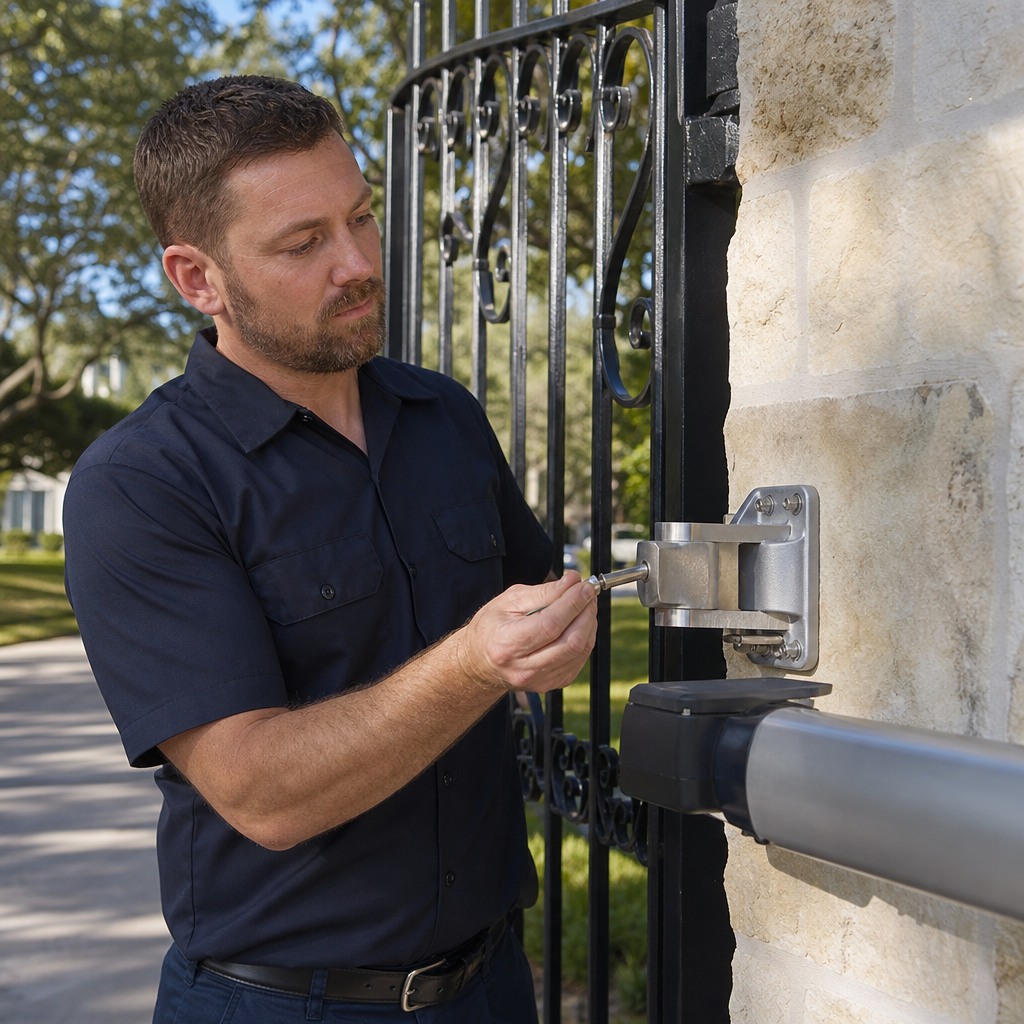
Diagnosing mechanical resistance by isolating the gate leaf is an essential step recommended by Ironworks Gate Co. to prevent motor strain and damage.
Mechanical Drag vs. Electrical Failure
When hinges bind or rollers drag along a misaligned ground track, the motor must exert extra force to overcome physical resistance. Increasing force limits instead of resolving physical binding can cause severe mechanical damage and creates dangerous operating conditions.
Inspecting Hinges, Rollers, Tracks, and Drive Components
- Disengage the Drive: Follow the manufacturer manual to safely release the drive mechanism.
- Test Manual Travel: Move the gate leaf through its travel path by hand. It should move smoothly with consistent effort.
- Inspect Slide Gate Rollers and Tracks: Check for damaged bearings, rust accumulation, debris in the track, or misaligned guide rollers. Ensure mechanical end stops are securely attached at both ends of travel to prevent overtravel or derailment.
- Inspect Swing Gate Hinges: Look for hinge wear, post leaning, or structural damage near hinge attachment points. Changing gaps near posts or hinges can create crushing zones that require proper guarding.
- Verify Chain Tension: On slide gates, inspect the drive chain for excessive slack or binding. Refer to the manufacturer manual for proper chain tension specifications.
Step 5: Diagnose Gate Operator Motors, Capacitors, and Control Boards
If the gate moves smoothly by hand without binding, the issue may involve the drive motor, hydraulic system, or control circuitry.
Motor and Hydraulic Systems
If the motor hums but does not move, or if a hydraulic operator shows signs of oil leakage or loss of operating pressure, refer to the manufacturer manual. All electrical, capacitor, and hydraulic servicing should be performed by a qualified technician.
Identifying Control Board Issues
Check the control cabinet for visible signs of damage, such as scorch marks from power surges, pest intrusion, or loose terminal connections. Check digital diagnostic displays against the operator manual fault codes. Do not attempt board-level electrical repairs without proper qualification.
Step 6: Travel Limits and Force Limitation Safety
Need automatic gate troubleshooting?
We’re available now - call for a fast, free estimate.
Travel limits control where the gate stops in the open and closed positions. If these limits shift out of adjustment, the gate may strike physical stops or fail to close properly.
Travel Limits and Mechanical End Stops
- Locate Limit Controls: Refer to the manufacturer manual to identify the limit switches, magnetic sensors, or digital encoder settings on your operator.
- Check Stop Positions: Verify that limits allow the gate to stop smoothly without placing mechanical strain on the operator or structural components.
- Verify Physical End Stops: Confirm that physical end stops remain securely fastened to prevent overtravel if a limit switch fails.
Closing Force and Detection Device Safety
Automatic gate operators incorporate force-limiting and reversal features to reduce entrapment risks. Excessive closing force and failure to detect persons at closing edges are severe safety hazards. Never adjust force settings beyond the manufacturer specifications to overcome mechanical binding. Adjusting force limits, safety sensors, and reversal settings requires adherence to the operator manual and should be handled by a qualified technician.[3]
Automatic Gate Opener Systems and Components
Automatic gate configurations differ based on property layout, gate weight, and operational requirements:
- Electromechanical Swing Operators: Use linear screw drives, articulating arms, or underground drive units to swing gates open and closed.
- Hydraulic Swing Operators: Use pressurized hydraulic fluid to operate swing gates smoothly under varying operating conditions.
- Slide Gate Operators: Use chain drives, gear racks, or friction drives to move sliding gates along a ground track or cantilever system.
- Access Control Interfaces: Manage input signals from keypads, radio receivers, exit wands, and loop detectors.
Automatic Gate Troubleshooting and Repair Considerations
Proper gate maintenance, as noted by Ironworks Gate Co., balances structural integrity with electrical and safety system performance.
Key Considerations for Professional Service
- Root-Cause Evaluation: Addressing track settlement, hinge wear, or post movement rather than simply replacing electrical components.
- Safety System Verification: Ensuring monitored safety sensors, edge detection, guarding, end stops, and force limitation function in accordance with safety standards.
- Weatherproofing and Enclosure Maintenance: Verifying conduit seals, enclosure gaskets, and insect protection inside operator housings.
Factors Influencing Repair Requirements
While property owners can safely clear track debris, clean optical sensors, and replace remote control batteries, all work involving electrical supply, hydraulic pressure, structural welding, force limitation settings, safety sensor wiring, and circuit board replacement should be directed to the operator manual and completed by a qualified technician.
Frequently Asked Questions About Automatic Gate Troubleshooting
Why is my automatic gate not opening or closing?
A gate that does not respond may have a tripped breaker, an open reset switch, depleted remote batteries, a blown fuse, or an active safety sensor fault. Verify power supply switches, clean optical sensors, check that the manual release is engaged, and consult the operator manual for error indicators.
How do I reset an electric gate opener motor?
Refer to your specific operator manual for manufacturer-approved reset and power-cycling instructions. If the system continues to experience faults or blow fuses after a reset, shut off power and contact a qualified technician.
Why does my driveway gate start closing and then reverse?
Gates typically reverse during closing when safety sensors detect an obstruction, when sensor wiring is compromised, or when the gate encounters physical resistance that activates internal force-limitation safety mechanisms. Inspect the travel path for obstructions and check sensors, but never increase force limits to bypass mechanical binding.
How do I check if my gate photo eye sensors are aligned or faulty?
Clean the sensor lenses and check the status indicator lights against the manufacturer manual, as LED indications differ across models. Ensure the line of sight between the transmitter and receiver is clear. Never bypass safety sensors if a fault is present.
What should I do if my automatic gate remote control stops working?
Replace the remote battery and verify the remote indicator operates when pressed. If the remote still fails, test hardwired access devices such as a wall switch or keypad. If hardwired controls work, refer to the manual for remote reprogramming procedures or seek professional assistance.
When is an automatic gate problem safe to DIY vs calling a professional?
Low-risk maintenance such as cleaning sensor lenses, removing debris from ground tracks, and replacing remote control batteries can be performed by owners. However, you must call a qualified technician whenever troubleshooting involves electrical supplies, hydraulic systems, circuit boards, structural components, travel end stops, or force-limit and safety sensor recalibrations. Never bypass safety devices.
Need automatic gate troubleshooting?
We’re available now - call for a fast, free estimate.
Sources
- New Safety Standard for Automatic Security Gates Helps Prevent … – cpsc.gov (2000)
- FY2015 Annual Report to Congress – cpsc.gov (2013)
- Risks to pedestrians from crushing zones on electrically … – hse.gov.uk (2010)
- www.hse.gov.uk · work-equipment-machinery · poweredEnsuring powered doors and gates are safe – HSE – hse.gov.uk (2006)
Related reading: Driveway Gate Repair – Call Now-10% Off – On-Site in 60 Minutes – Free Estimate
Related reading: Automatic Gate Repair Dallas | 10% Off & Free Estimate | On-Site in 60 Minutes
Related reading: Gate Sensor Repair – Call Now-10% Off – On-Site in 60 Minutes – Free Estimate
Frequently Asked Questions
What causes an automatic gate motor to hum without moving?
An electric gate motor that hums without moving typically indicates a failed motor capacitor, low operating voltage, or severe physical drag along the tracks and hinges. Because testing high-voltage capacitors and drive mechanisms carries safety risks, Ironworks Gate Co. provides professional on-site diagnostic assessments to safely identify and repair the underlying fault.
How can I tell if my gate operator circuit board is damaged?
Signs of a fried control board include visible scorch marks, burnt electrical odors, unresponsive diagnostic LEDs, or erratic gate behavior after a storm or pest intrusion. When board-level failures occur, contacting Ironworks Gate Co. for same-day repair ensures proper replacement and recalibration without risking damage to connected safety sensors.
How often should an automated driveway gate system be professionally serviced?
Residential and commercial automatic gates should be professionally inspected at least once every six to twelve months to maintain safety compliance and mechanical reliability. Routine diagnostic checkups from Ironworks Gate Co. help identify hinge wear, chain slack, and force-limit drift before they cause expensive motor or structural failures.
About the author
 |
Christopher Vance Christopher Vance brings over 12 years of hands-on experience in access control and automatic gate systems. Certified by the Institute of Door Dealer Education and Accreditation (IDEA), he specializes in troubleshooting complex gate operator issues and providing transparent cost assessments. Based in Texas, Christopher is dedicated to educating property owners on safe, reliable gate maintenance and repair. |
Gate not opening, off track, or opener dead?
We’re available now - call for a fast, free estimate.
Call Now - Free Estimate